How I used Claude Skills to transform messy supplier datasheets into clean, consistent JSON—and why it matters for battery engineers.
Table of Contents
- The Problem: Every Supplier Speaks a Different Language
- Enter Claude Skills: Procedural Knowledge for AI
- Demo: See It in Action
- The Skill Architecture For Cell Tech-Specs Extraction
- The Time Savings Are Real
- Key Learnings
- Resources
The Problem: Every Supplier Speaks a Different Language
It's 4 PM on a Friday. You're looking forward to having dinner with your friends. Then your boss pings: "Hey, can you whip up a quick comparison of those 5 new cells asap?"
Sure, why not? Five cells. Twenty minutes, tops. Quick and painless.
You open the first PDF—looks fine. The second uses completely different terms. And the third? Data buried in dense tables with merged cells that look like abstract art.
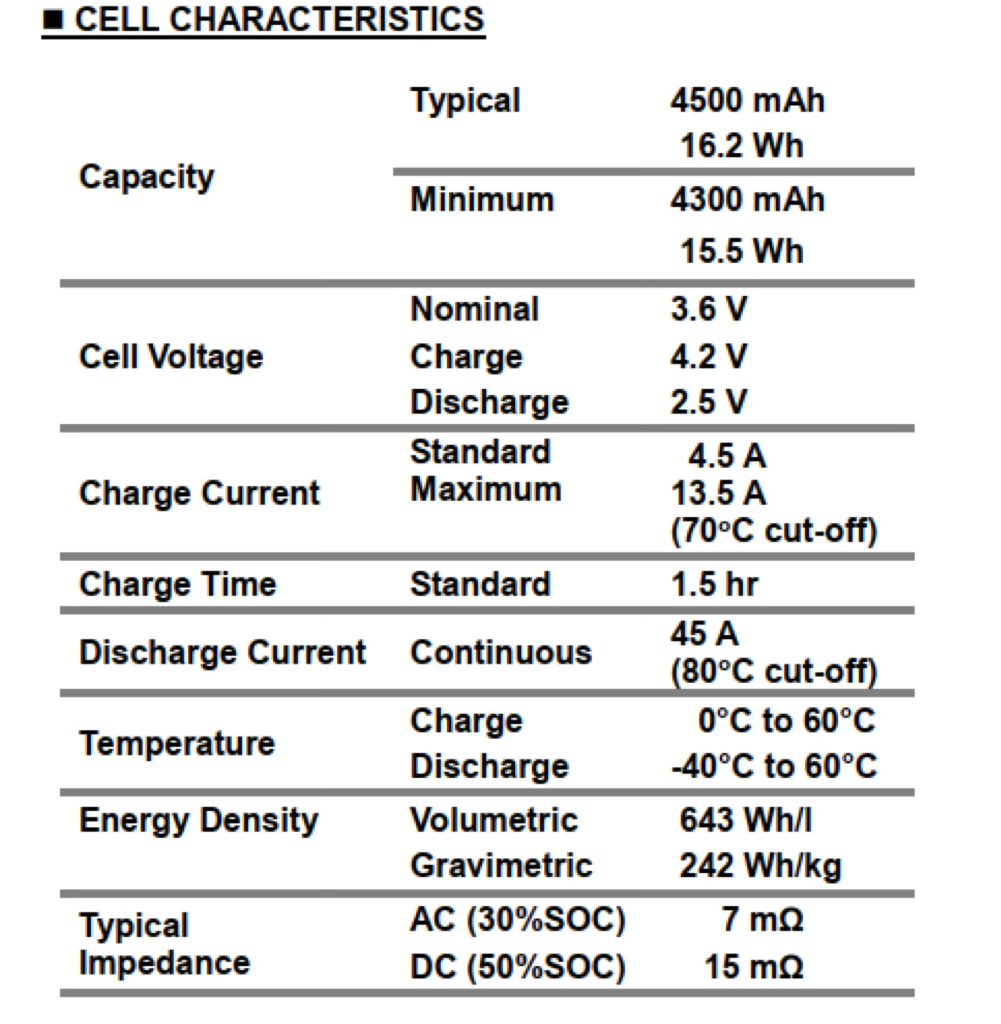
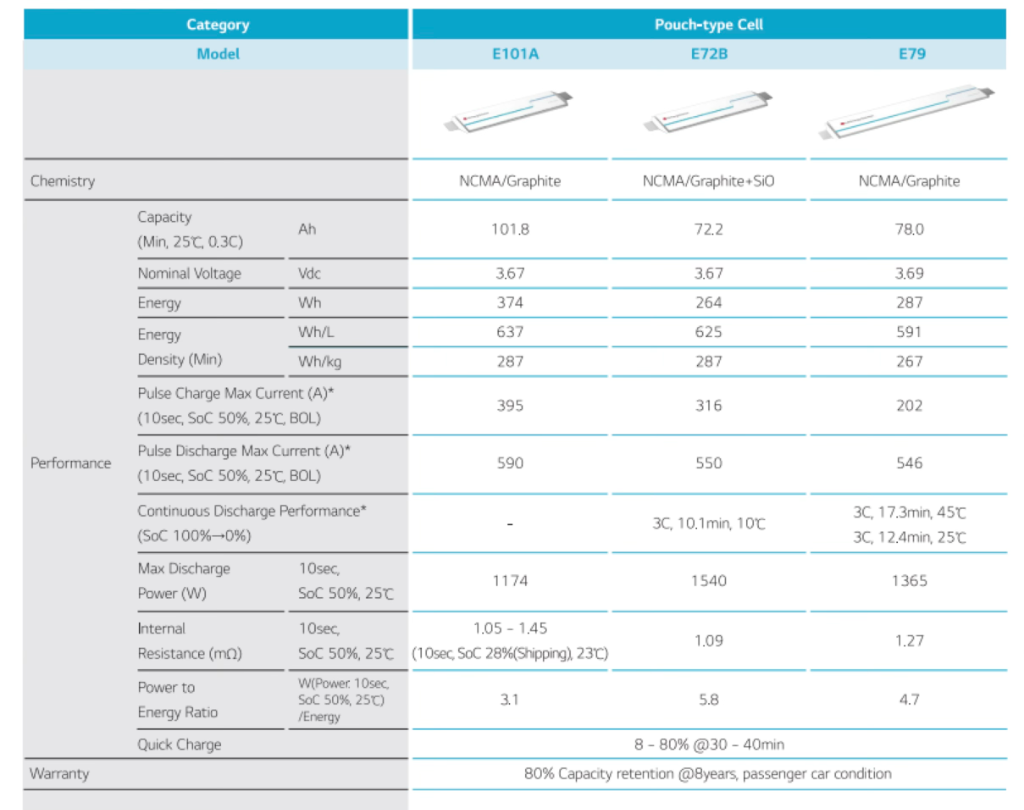
So you started putting those numbers in an Excel sheet, just like the table below. You spend quite a long time diligently copying all the data. And then it hits you: "Damn! The suppliers are speaking completely different languages!" One says "Nominal Capacity," another says "Typical Capacity." One measures impedance at 10 seconds, another at 2 seconds. How on earth are you supposed to compare those for one single parameter?
| Specification | Supplier A | Supplier B | Supplier C |
|---|---|---|---|
| DCIR | "DCIR @ 40°C, 10s pause" | "AC impedance at 1 kHz" | "Internal resistance ≤18mΩ" |
| Cycle Life | "500 cycles at 80% DOD" | "2000 times (0.5C/0.5C)" | "≥800 cycles to 80% capacity" |
| Capacity | "3000mAh (typ.)" | "Min: 2900mAh, Nom: 3000mAh" | "3.0Ah nominal" |
That "quick 20-minute task" at 4 PM? It's now 8 PM. You missed dinner with friends. And you're sitting there thinking: "I did NOT get a PhD to become an expert at copy-paste."
For years, this was just... how the industry worked. No standards. Every manufacturer doing their own thing. The only solution? Hire someone with deep battery expertise—and have them do the world's most soul-crushing data entry. Nothing kills passion faster than copy-paste-double-check-repeat on loop.
I kept thinking: There HAS to be a better way. With the rapid evolution of large language models, I've found that Claude Skills are perfect for this. Honestly, it saved my sanity—and my Friday nights. Let me show you how to build one so you can get yours back, too.
Enter Claude Skills: Procedural Knowledge for AI
Recently, I kept seeing people on X talking about how awesome is Claude Skills. After researching through YouTube videos and documentation, I realized that extracting data from chaotic PDFs and standardizing the output was the perfect use case.
What Are Claude Skills?
Claude Skills are specialized folders containing instructions, scripts, and resources. They allow Claude to perform repeatable, complex workflows without you having to re-explain the rules in every new chat.
Think of them like your favorite recipe that you've perfected over the years. You write it down once—every step, every technique, every little trick you've learned. And from then on, anyone can follow it and get the same great result.
That's a Claude Skill. It's a set of instructions, scripts, and reference files that teach Claude how to do a specific task. You set it up once, and Claude follows those instructions every time.
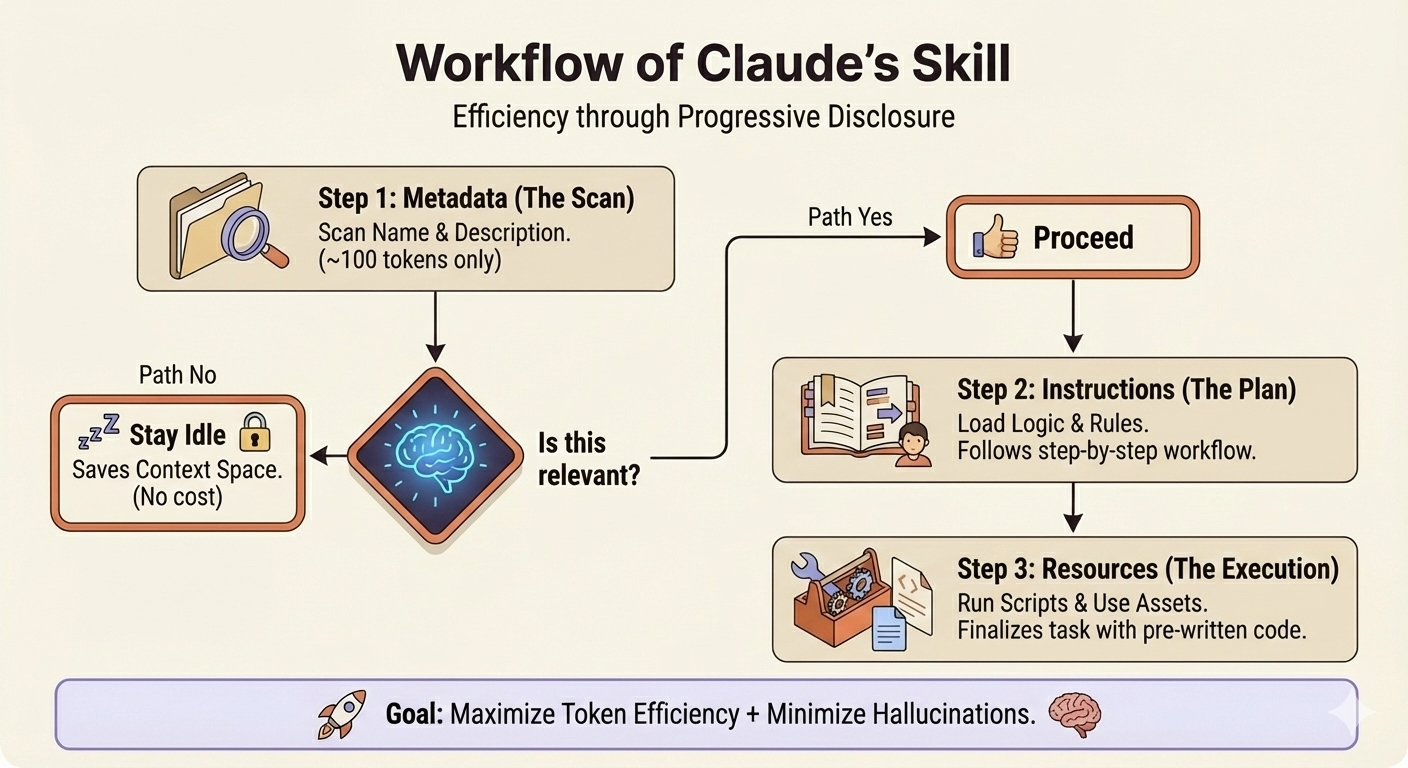
Additionally, Claude Skills use Progressive Disclosure to stay efficient:
- Matching phase: Claude scans all your Skills to find relevant ones (~100 tokens).
- Loading phase: Only when you confirm, Claude loads the full instructions.
- Execution phase: Claude follows the Skill's instructions and runs any scripts.
This means inactive Skills barely consume tokens. You can have dozens without bloating your context window.
Why Battery Data Extraction Is Perfect for Skills
Battery datasheet extraction is fundamentally a procedural knowledge problem. The properties are consistent across all suppliers:
- Mechanical (dimensions, weight)
- Electrical (capacity, voltage, resistance)
- Thermal (operating temperature, storage limits)
- Aging (cycle life, calendar life)
What varies is how each supplier presents this data. That's exactly what Skills handle well.
Compared to using a general-purpose chat (like dropping a PDF into ChatGPT), Skills offer key advantages:
- Focused extraction: The Skill knows exactly which properties to look for
- Normalization: Different units and formats get converted to a standard output
- Continuous improvement: Every new edge case you encounter sharpens the tool
- Reduced errors: Narrowing the scope reduces hallucination and data mismatches
For example, battery suppliers use different units for the same measurements. A Skill can automatically check and convert units every time you extract data.
This is exactly what Skills excel at.
Demo: See It in Action
You can find my skill and the complete vault on GitHub: battery-cell-extraction-claude-skills
Quick Start:
- Create a zip file of the
battery-cell-extraction/folder - Open Claude settings → Import the zip file as a custom skill
- Drop a PDF into Claude and say: "Extract cell data sheets for me."
- Claude loads the skill, extracts structured JSON data
- Copy the output to your local
output/folder
The Skill Architecture For Cell Tech-Specs Extraction
The skill has four lean components:
battery-cell-extraction/
├── SKILL.md                 # Instructions (~6KB, token-optimized)
├── scripts/extractor.py     # Parsing functions
├── normalization_rules.yaml # Supplier field mappings
└── validation_schema.json   # Output structure
How SKILL.md Works
The instructions follow a simple flow: Find → Extract → Normalize → Validate → Output.
| Section | Purpose |
|---|---|
| A: Data Identification | Locate tables, identify layout pattern |
| B: Extraction | Parse values, handle unit conversions |
| C: Normalization | Map supplier terms to standard fields |
| D: Validation | Check ranges, flag uncertainties |
| E: Output | Generate JSON with confidence scores |
Pattern Recognition: Taming Table Chaos
Different suppliers format tables differently. The skill identifies the pattern before extracting:
| Pattern | What It Looks Like |
|---|---|
| Key-Value | Simple 2-column (Parameter | Value) |
| Multi-Condition | Merged cells with nested conditions |
| Visual Grouping | Indentation-based, no borders |
| Comparison | Multiple products in columns |
[!TIP] When new suppliers appear, just update
normalization_rules.yaml—no code changes needed.
Field Normalization
The YAML file maps 100+ variations to standard names:
# Example: "Nominal Capacity", "Rated Capacity", "Typical Capacity"
#          all map to → capacity.nominal_ah
Output Structure
Every extraction produces consistent JSON:
cell_info      → manufacturer, model, chemistry, format
mechanical     → dimensions, weight
electrical     → capacity, voltage, impedance, current
derived        → energy, power density (calculated)
metadata       → confidence scores, missing fields, warnings
Full schema definition lives in validation_schema.json.
The Time Savings Are Real
What used to take 15-20 minutes of tedious copy-paste work now takes less than 2 minutes. That's a 90% time reduction—and more importantly, you get consistent, validated data every time.
| Before (Manual) | After (Claude Skill) | |
|---|---|---|
| Time per datasheet | 15-20 minutes | < 2 minutes |
| Error checking | None (hope for the best) | Automatic validation + confidence scores |
| New supplier format | Hours of reformatting | ~30 minutes to update YAML mappings |
Try it yourself: Start with a single datasheet. Once you see how clean the output is, you'll never want to go back to manual extraction.
Key Learnings
1. Skills vs. MCP vs. Projects: Right Tool for the Job
When I first started, I was honestly confused between Claude's different tools: Projects, MCP, and Skills. Projects give Claude fixed context—great for keeping documents or code available across chats, but not for encoding repeatable procedures. MCP (Model Context Protocol) is about connectivity—fetching live data from databases, filesystems, or APIs. Powerful, but overkill when you just need to process local PDFs.
That's when I realized Skills were the perfect fit. They're designed for procedural knowledge—teaching Claude how to do a specific task the same way every time. For extracting and normalizing battery data from PDFs, Skills are simpler, more efficient, and exactly what the job requires.
2. Combine LLM Flexibility with Python Precision
The magic formula: Use Claude's natural language understanding for format variations ("3000mAh" vs "3.0Ah" vs "3000 mAh (typical)"), but delegate deterministic operations (unit conversions, calculations) to Python.
3. Validation is Non-Negotiable
LLMs can hallucinate. I built comprehensive validation including:
- Schema validation
- Range checking (capacity > 0, voltage in reasonable range)
- Confidence scoring per section
- Explicit flagging of missing or uncertain data Please go to my GitHub repository to understand how I tackle those issues.
4. Iteration is Built-In
When the skill misses something or a new supplier format appears, I update the markdown instructions or YAML mappings—no coding required. This makes the solution maintainable by domain experts, not just developers.
For Non-Battery Engineers
If you're dealing with similar data normalization challenges in your domain—medical records, financial statements, technical specifications—consider whether Claude Skills could help. The key question: Is your problem about encoding procedural knowledge?
If yes,Claude Skills might be your game-changer.
Resources
- Claude Skills Documentation: Available through Claude.ai
- My GitHub Repository: Try it yourself and download the complete implementation
- Sample Datasheets: Test with your own supplier PDFs
- YouTube Viedeos that I think it is good to learn about Claude Skills: https://www.youtube.com/watch?v=HCwfRe5EHGQ
Have questions or want to see a live demo? Connect with me on LinkedIn or check out my other articles on AI-assisted workflows.
Tags: #ClaudeSkills #AI #BatteryEngineering #DataExtraction #Automation #ProductivityTools