I Failed at the Second Brain for 3 Years. Here's How AI Agents Key Fixed It.🚀
Table of Contents
- Why I'm Obsessed with the "Second Brain"
- My Digital Note Journey
- The Breakthrough: AI as My Knowledge Management Assistant
- What I've Learned
- If You Want to Try This
- Useful Toolkit
- 💡 Why I Chose This Over Notion AI
Why I'm Obsessed with the "Second Brain"
Confession time: my memory is terrible. I've taken a lot of notes because I know the act of writing creates genuine connections in your brain—it helps you understand things better. I also believe your brain is for having ideas, not holding them. That's not just a productivity quote—it's backed by neuroscience. Cognitive Load Theory shows that working memory has strict limits. Every fact you try to "hold in your head" competes with your ability to think creatively. The more you offload to an external system, the more mental bandwidth you free up for actual thinking.
I've read the classics—How to Take Smart Notes by Sönke Ahrens (the Zettelkasten method), Building a Second Brain by Tiago Forte (digital organization). I've tried every tool: Notion, Obsidian, Roam Research, Flomo, even Confluence at work. I understood the philosophy. I took all the right steps. But I always struggled to maintain any system consistently.
Looking back, I realized I'd spent countless hours learning how to take notes—reading books, watching tutorials, setting up systems—instead of actually using them. The problem wasn't understanding; it was sustainability. Organizing notes takes far more time and effort than writing them in the first place. And if you know anything about how habits work, you know that reducing resistance is everything. High-friction habits don't stick.
Until recently, I hadn't found any tool that truly solved this problem. But before I jump to how AI + Obsidian changed everything, let me walk through my digital note-taking journey—because understanding what didn't work is essential to appreciating what finally did.
My Digital Note Journey
I started with Notion. Beautiful design, flexible databases, great for collaboration. But after a year, I hit a wall.
I found myself spending more time making pages look pretty than actually capturing ideas. Scrolling through YouTube tutorials, tweaking templates, comparing methodologies—none of that was actual knowledge work. And the nested page structure meant my notes had no visible connections. I couldn't see how one idea related to another.
Notion's nested page structure made it difficult for me to retrieve what I'd written—notes buried three layers deep might as well not exist. That frustrated me most. I realized I needed a tool that helps me think, not just store.
Then I discovered Obsidian, and something clicked.
Local storage, plain text, bidirectional links. With WikiLink syntax, I could connect
any two ideas instantly—no folders, no hierarchy, just relationships. The Graph View showed my
ideas as a constellation of connected nodes. This wasn't just storage. This was a thinking tool.
But the problems didn't vanish. Once again, I sank hours into YouTube—learning plugins, comparing workflows, rebuilding my entire system every time.
Six months later, my "perfect setup" looked like this:
- Inbox: 100+ unprocessed items
- Reading notes: Written once, never opened
- Concept cards: Links everywhere, making zero sense
- MOCs (Maps of Content): Three versions, all contradicting each other
The irony? I became a "tool expert" instead of a "knowledge manager."
Here's what I finally realized: Maintaining a knowledge system costs far more than building it. Writing a note takes 10 minutes. Categorizing, tagging, linking, updating MOCs? That's 30 more. As your library grows, the maintenance burden compounds. After three rounds, I gave up.
The real problem wasn't the tools—it was the "human-powered maintenance" model.
The Breakthrough: AI as My Knowledge Management Assistant
In 2025, I started exploring how AI could help with my notes. There are several approaches:
- Notion AI — Built into Notion, but limited to in-page assistance
- Obsidian AI plugins — Co-pilot style plugins for Obsidian
- IDE + Obsidian — Treating your vault as a codebase, editing with VS Code, Cursor, or similar
I tried multiple ways. But the approach that worked best for me? Treating Obsidian like a codebase—editing directly with an AI-powered IDE.
I use Antigravity (Google DeepMind's Agent IDE) because I'm a Google One subscriber, which gives generous access to high-performance models like Gemini 3 Pro. But Cursor, VS Code with Copilot, or any Agent IDE will work.
Here's what's different: this isn't your typical "AI writing assistant." It's treating your entire knowledge base as a project, with an AI Agent doing the maintenance. That stress of organizing, tagging, linking, updating MOCs? Largely gone. The AI handles it.
(I'll explain why I chose this over Notion AI at the end of the article—for now, let's dive into the workflow.)
Here's what I discovered works. I'll walk through it in four parts:
- Capturing ideas — Getting notes into Obsidian with minimal friction
- Organizing at scale — Letting AI handle batch restructuring
- Tracking your thinking — Using Git + AI for automatic reflection
- The toolkit — What I actually use daily
1. Mobile Chats → Direct Obsidian-Formatted Notes
I love chatting with AI about what I'm learning—YouTube videos, articles, books. With tools like Gemini offering massive context windows, I can dump an entire PDF and have a deep conversation about it.
As Richard Feynman famously said: "If you can't explain it simply, you don't understand it well enough." Chatting with AI forces that exercise—you discuss, ask questions, reframe concepts until you actually understand them.
But here's the problem: those conversations evaporate.
I realized I was chatting with AI about the same topics I'd discussed 2-3 weeks earlier—without remembering. Every new chat session is essentially a memory reset. Yes, ChatGPT has a "memory" feature now, but it won't proactively say, "Hey, you discussed this exact topic 3 months ago."
With Obsidian, that changes. Your notes persist. When you start a new topic, you can search and discover—there's a plugin called Smart Connections that does semantic search, not just keyword matching (I'll explain why this matters later)—"Wait, I already explored this in March." You refresh your memory instead of starting from scratch. Your past thinking becomes findable.
Here's the hack: configure AI custom instructions to auto-format conversations into Obsidian-ready notes.
The setup: In Claude or Gemini's custom instructions, tell it how to output notes. After any conversation, just say "save this as a note"—and it formats into vault-compliant Markdown.
My Prompt Template (with explanations)
When I say "save note" or "save it as markdown":

---
created: {{date}}
status: seed
suggested_folder: Inbox
---
Why this structure:
- YAML frontmatter → Obsidian uses this for metadata;
status: seedmarks it as unprocessed - Suggested folder → AI proposes where it belongs (Inbox/Concepts/MOCs), but I make the final call
Formatting rules:
- Filename: kebab-case
- WikiLinks: Add concept only for terms worth their own notes
- Certainty marking:
  - AI reasoning → `> [!ai] Insight:`
  - Uncertain claims → `> [!uncertain] Unverified:`
Why certainty marking matters: This is my anti-hallucination rule. AI must flag its own reasoning vs. facts from our conversation. If it's guessing, it has to say so. No confidently stated nonsense.
After setup, when I say "save note," AI will:
- Organize the core content
- Add proper YAML frontmatter
- Link key concepts with WikiLinks
- Flag anything uncertain
Copy-paste to Obsidian, sync, done. Conversation value no longer evaporates.
2. Use AI to help you organize your notes
This surprised me most—AI doesn't just "execute commands." It has conversations like an assistant, helping you clarify what you actually need.
Here are two examples that show what I mean:
- Batch-cleaning imported notes — Making Flomo exports work with Thino
- Creating a project dashboard — AI writes Dataview code so I don't have to
Example 1: Flomo → Thino Integration
I use Flomo for quick voice capture on mobile—it's a lightweight Chinese app (~£2/month) that transcribes scattered thoughts instantly. On my iPhone, one tap opens voice input, and my idea is saved before I forget it. But when I export those notes to Obsidian, the Markdown format doesn't match Thino (the plugin I use for quick daily thoughts).
Instead of writing Python scripts to reformat them, I simply asked AI: "Clean up these Flomo imports to match my Thino format."
Done. AI batch-processed everything—fixing timestamps, adjusting tags, reformatting content. Now all my 2025 notes from Flomo appear seamlessly in Thino alongside my other daily thoughts.
Example 2: Creating a Project Dashboard
I have too many projects running simultaneously—this blog, side projects, 3 books opened at once, random reading notes. Problem: I'd write half a draft, then forget where I left off the next day.
I told AI: "I want a homepage where I can see which projects are still in progress."
AI scanned my file structure, noticed I had the Dataview plugin installed, and created a dynamic dashboard for me—using Dataview syntax to auto-list all in-progress drafts.
How much time did this save? If I'd done it myself: learn Dataview syntax, research folder queries, figure out status filtering... hours of "tool research." AI skipped all that and gave me working code.
The fun part was the follow-up conversation—I asked: "Should I install a kanban plugin too?"
It said no: "Your problem isn't missing tools—it's missing a daily entry point. Keep it simple first. Add more when needed."
That's what an "AI assitant" feels like—not a command-following machine, but a collaborator who helps clarify problems and gives advice. It drops the "learn the plugin" barrier to zero.
3. Git + AI: Auto-Tracking Your Thinking Path
One plugin I highly recommend: Obsidian Git.
Here's why it's a no-brainer: with Git version control enabled, AI can analyze your commit history and generate a daily summary of what you worked on. Zero effort reflection. You get answers to questions like: What was I thinking about today? Where did my focus go?
The prompt is simple:
"Check today's git log and summarize it into a 'Daily Thinking Path'—what topics I focused on, which notes I edited, how my thinking evolved."
I don't need to spend time to write daily summary anymore—Git records everything, AI makes it human-readable.
Reducing Friction Even Further
But let's be honest: even typing one prompt daily is friction. If it's not automatic, I'll skip it eventually. So I set up a slash command workflow:
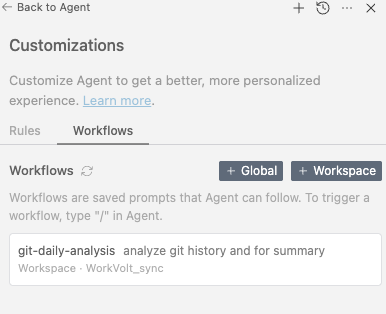
My IDE (Antigravity) lets me save complex AI operations as "Workflows"—triggered with a slash
command. I created /git-daily-analysis in Workflow setting. One command after one day's
work, and the Agent reads today's commits, generates the thinking path, and appends it to my Daily
Note.
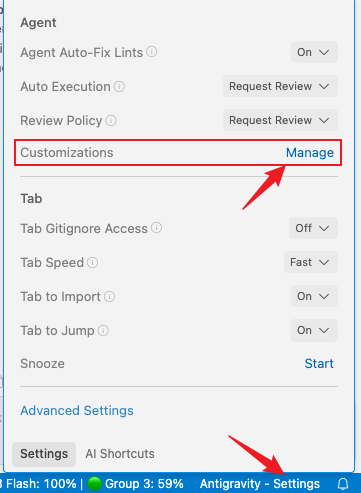
Below, you can see where to find these workflow settings in Antigravity. (The setup in Cursor is very
similar.)
Here is an example of how I set the Rule for Workflow on Git daily analysis, just for your reference:
Daily Thinking Path Analysis

Follow these steps:

1. Run `git log --since="00:00" --pretty=format:"%h | %s" --name-only` to view today's commits

2. Analyze these changes and summarize into a "Daily Thinking Path," including:
   - **Today's Focus Topics**: Which themes/areas did I edit notes in today
   - **Major Updates**: Which files had significant additions or deletions (use git diff to help judge)
   - **Flow of Thought**: From first change to last, how did my thinking evolve

3. Get today's date (format: YYYY-MM-DD)

4. Append the summary to `Git Daily Notes/[today's date].md` under the `## Thinking Path` section
   - If the file doesn't exist, create it
   - If the section already exists, update it

5. End with a one-sentence AI Insight suggesting what to focus on tomorrow

Example output format:

## Thinking Path

### Today's Focus Topics
- Knowledge Management → Researching AI + Obsidian workflows
- Startup Reflections → Updated Q4 retrospective

### Major Updates
- `AI-Obsidian.md`: Added Git workflow suggestions (+50 lines)

### Flow of Thought
1. Morning: Started with "How to use AI for note organization"
2. Expanded to "Git version control" ideas
3. Ended at "Using commit history to track thinking"

> [!NOTE] AI Insight
> Today's thinking focused on "tool workflow optimization." Tomorrow, try focusing on content itself.
To summarize: this workflow automates the daily review process. By analyzing the raw data of your file changes (Git logs), the AI reconstructs your "thinking path," identifying not just what you changed, but why—turning your version history into a meaningful daily journal without any manual effort.
"Manual journaling" becomes "typing one slash command."
What I've Learned
For years, I chased the "perfect knowledge management system"—perfect categories, perfect links, perfect workflows. But I kept bouncing between tools: Notion when I wanted pretty pages, Obsidian when I wanted connections. Back and forth. My notes ended up scattered across both, and organizing them became a burden instead of a benefit.
My advice? Pick one tool and stick with it. Don't end up like me with knowledge fragments everywhere.
Here's what I missed: The maintenance cost is too high. People give up.
Now AI can be your "knowledge management assistant":
- It's not perfect, but it doesn't get tired
- It can't think for you, but it can organize for you
- It can't create knowledge, but it can find connections
The Second Brain's problem was never that tools weren't good enough—it's that humans don't have the energy to keep maintaining them.
AI solves exactly that.
If You Want to Try This
Here's my advice for getting started with AI + Obsidian:
- Minimum viable start: Enable Git for your vault. Use AI to analyze commit history. See "what you thought about today."
- Semantic search: Install Smart Connections. Experience "asking questions instead of searching keywords."
- Gradual automation: Hand repetitive organization tasks to AI Agents.
And one warning I wish I'd heard earlier:
Don't make the mistake I made—chasing every shiny plugin, fearing you'll be "left behind."
There is no perfect tool. Your goal is to capture thoughts and retrieve them when needed. Obsidian is just a tool to help you do that. If you spend more time learning the tool than actually thinking, you've lost the plot. I did. Don't repeat my mistake.
No need to go all-in at once. Take it slow. Let AI lighten your load.
I found these toolkit is useful
| Tool | Type | Purpose |
|---|---|---|
| Obsidian | App | Local-first knowledge base, pure Markdown |
| Obsidian Git | Obsidian Plugin | Auto-commits changes, enables AI to analyze your thinking history |
| Smart Connections | Obsidian Plugin | Semantic search—find related notes by meaning, not just keywords |
| Dataview | Obsidian Plugin | Query your notes like a database; powers dynamic dashboards |
| Thino | Obsidian Plugin | Quick daily thoughts capture, integrates with Flomo exports |
| Antigravity | Agent IDE | Batch file edits, AI workflows, slash commands |
| Gemini | AI Service | Google is very generous of their tokens |
| Claude | AI Service | Opus 4.5 is the most stable model for coding and text I found so far |
#knowledge-management #Obsidian #SecondBrain #AI-workflow #Productivity
💡 Why I Chose This Over Notion AI
Earlier, I promised to explain why I didn't stick with Notion AI. Here's the breakdown:
The Two Main Problems
-
Cost redundancy + missing features: If you already subscribe to ChatGPT, Gemini, or Claude, paying another $10-20/month for Notion AI is wasteful. Worse, Notion AI only works inside a Notion page—you're accessing AI through a narrow window. Direct subscriptions unlock far more: Claude works in VS Code and other IDEs for coding, ChatGPT has plugins and advanced voice mode, Gemini offers massive context windows. If you code a lot like me, a Claude subscription gives you access to models like Claude Opus 4.5—widely regarded as one of the best coding models available right now. Notion AI can't touch that.
-
Limited scope: Even within Notion, the AI can only help with in-page tasks—rewriting text, summarizing content. But it can't batch-edit 50 files, restructure your folder system, or analyze your entire vault. For serious knowledge work, that's not enough. I know you could set up Claude MCP connected with Notion, but to be honest, that's quite a lot of work.
At a Glance
| Notion AI | Obsidian + AI Agent | |
|---|---|---|
| Cost | $10-20+/month extra | Included in existing AI subscription |
| Data | Cloud-only | 100% local |
| Flexibility | Notion's features only | Your rules, your workflows |
| Bulk Edits | One page at a time | multiple files in minutes |
| Export | Messy | Already Markdown |
Bottom line: If you're already paying for ChatGPT, Claude, or Gemini, skip Notion AI. Local Markdown + an Agent IDE gives you more power, more control—at no extra cost.
Your notes. Your rules. Your AI.